Cost Tracking & Optimization
KodaCode does two separate things here:
- it makes cost visible
- it gives you a few explicit ways to reduce cost without hiding runtime behavior
This page focuses on those user-facing optimization levers and on how to inspect what they actually saved.
Fastest ways to spend less
Section titled “Fastest ways to spend less”These are the highest-leverage user-facing cost controls:
| Control | What it changes | Best when |
|---|---|---|
default sessions.response_style: terse |
Shorter ordinary assistant replies | You want less narration and lower output token cost |
/compress |
Shrinks saved workspace prompt sources | Your AGENTS.md or project memory has become repetitive |
utility_model |
Routes runtime utility text work to a cheaper model | You want to keep the main coding model but reduce background cost |
output_budgets |
Caps the output tokens requested by role | Provider/model ceilings are much larger than your normal turn needs |
compaction_threshold and /compact |
Summarizes older stored history so long sessions do not replay full history forever | You work in long-lived sessions |
workflow.review_model |
Sends review passes to a designated review model | You use engineer with review flow and want reviews on a separate model from the main agent |
budget and total_budget |
Warns early and stops future turns | You want hard spending guardrails |
One reason the product defaults to terse mode is that it is usually the cheapest and simplest output-side cost cut.
Automatic Savings
Section titled “Automatic Savings”KodaCode also cuts cost automatically. These optimizations try to remove
repetition, schema clutter, or old raw output, not useful task context. /cost
and /trace show the labels when savings apply.
| Label | What saves cost | Quality impact |
|---|---|---|
prompt compaction |
Sends a shorter rule-based copy of structured instructions | Best when instructions use headings and bullets. Long prose with subtle nuance may compress less safely. |
history compaction |
Replays a saved summary of older turns instead of full raw history | Keeps long sessions usable. Exact old details may need to be recovered from files or /trace. |
current-turn projection |
Replaces earlier large tool results in the same turn with placeholders after later work has used them | Reduces noise. If exact old output matters again, the model may need to re-read or rerun a focused tool call. |
tool catalog compression |
Shortens provider-facing tool schemas and descriptions while preserving required fields | Usually improves focus. Tools that need rich guidance keep it. |
batch efficiency |
Handles compatible independent tool calls in one tool step | Does not remove information. Mutating and blocking tools still create runtime boundaries. |
These savings are estimates, not provider invoices. KodaCode converts avoided input tokens to estimated dollars only when model pricing is known.
For best results, keep saved instructions concise and structured:
## Engineering Priorities
- Correctness first- Clear responsibility boundaries- Run focused tests before finishing
Avoid burying important policy in long repeated prose. It is harder to compact and harder for humans to maintain.
Terse mode
Section titled “Terse mode”response_style: terse reduces ordinary model reply length, which directly cuts output token cost for interactive sessions. This is already the default:
sessions: response_style: default # set this only if you want fuller ordinary narrationThis is the fastest user-facing cost cut because it does not change tools, routing, or the TUI. It just tells the model to keep ordinary prose brief.
Terse mode does not shorten:
- safety warnings
- permission explanations
- destructive-action confirmations
- ambiguity clarifications that still need to be explicit
For the full prompt-level behavior, see Context Management.
Utility model routing
Section titled “Utility model routing”utility_model routes background tasks to a cheaper model while keeping your primary route for real coding turns:
utility_model: openai/gpt-5-miniutility_model_timeout_seconds: 20 # default: 0 (no timeout)utility_model_retry_attempts: 1 # default: 1utility_model_retry_after_max_seconds: 5 # default: 5Tasks that use the utility model:
- session title generation
- workspace prompt-source compression via
/compress - history summaries for long sessions
These are tracked separately in the cost dialog so you can see what utility work costs versus agent turns.
Output budgets
Section titled “Output budgets”output_budgets separates normal requested output from provider hard ceilings.
This matters for models that can emit very large responses: the provider ceiling
is still available when needed, but ordinary turns do not ask for the maximum by
default.
output_budgets: agent_turn: 8192 agent_turn_thinking: 16000 review: 4096 utility_text: 2048For one model, use a model override:
model_overrides: - ref: anthropic/claude-sonnet-4-6 max_output_tokens: 64000 default_output_tokens: 12000max_output_tokens is the ceiling. default_output_tokens is the ordinary
agent-turn request, and KodaCode clamps it to the ceiling.
Review model
Section titled “Review model”If you use engineer workflow review, you can configure a designated review model without changing the main agent model:
workflow: review_mode: manual review_model: primary: openai/gpt-5-miniThis routes review passes separately while keeping the main model for
implementation turns. Runtime workflow YAML can also declare model: provider/model at the workflow or phase level when a whole workflow, or one
phase inside it, should use a different primary model.
Saved Workspace Compression
Section titled “Saved Workspace Compression”/compress rewrites workspace AGENTS.md and project memory entries through the same utility-model path used for other runtime text tasks. Unlike prompt compaction, this changes the saved source files on disk, so future turns start from smaller inputs instead of only receiving a provider-compacted rendering.
Use it when:
- repo instructions have accreted duplicated sections
- project memory entries are factual but wordy
- you want lower steady-state prompt cost for future sessions in this repo
Budget guardrails
Section titled “Budget guardrails”Budgets are not just reporting. They warn early and stop future turns once the limit is reached.
Use them when you want a hard product-level boundary on spending, not just lower average cost.
See Budgets for the full behaviour.
Cache pricing
Section titled “Cache pricing”For providers that report cache activity, the cost dialog shows:
- cache read tokens and cache write tokens broken out from regular input tokens
- whether cache pricing was applied or was unavailable for each turn
- estimated cache discount savings where cache pricing is known
For OpenAI-compatible providers, cached tokens are reported as a subset of input tokens and are normalized accordingly. DeepSeek prompt-cache hit tokens are reported as cache reads. Anthropic cache creation tokens are reported as cache writes. Gemini cached-content tokens are reported as cache reads.
OpenAI reasoning replay
Section titled “OpenAI reasoning replay”For OpenAI Responses reasoning models, KodaCode defaults to stateless requests
with responses_store: false and encrypted reasoning replay enabled. This adds
reasoning.encrypted_content to eligible Responses requests, then stores and
replays the returned encrypted reasoning item locally. That lets later tool-loop
requests continue from the provider’s encrypted reasoning state instead of
making the model reconstruct it from visible transcript alone.
providers: - id: openai responses_store: false encrypted_reasoning_replay: trueSet encrypted_reasoning_replay: false to prevent KodaCode from requesting,
persisting, or replaying encrypted OpenAI reasoning items.
Cost inspection
Section titled “Cost inspection”Inside the TUI:
/costopens the session cost dialog/trace [turn-number]opens a per-turn detail view
Use /cost when you want the session-level answer:
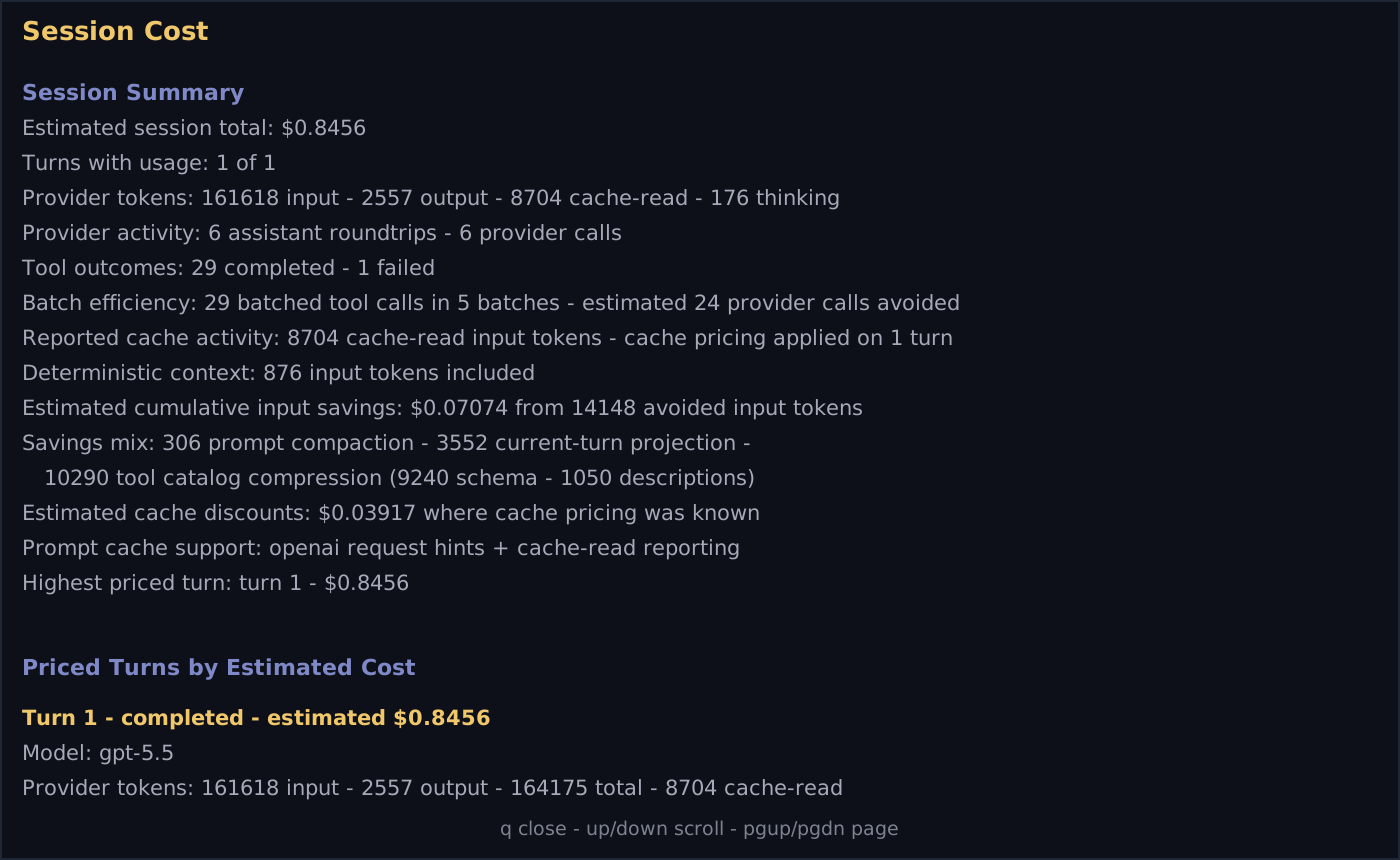
| Label | Meaning |
|---|---|
Estimated session total |
Current estimated spend for the session, or a priced subtotal when some model pricing is missing |
Provider tokens |
Provider-reported input, output, cache, and reasoning token counts when available |
Provider activity |
Number of assistant roundtrips and provider calls |
Batch efficiency |
Tool calls grouped into batches, plus the estimated provider calls avoided |
Reported cache activity |
Cache read/write tokens reported by the provider and whether cache pricing was applied |
Deterministic context |
Input tokens added by enabled context_packet sections, or omitted under input pressure |
Estimated cumulative input savings |
Avoided input tokens and estimated dollar savings from prompt, history, current-turn, and tool-catalog optimizations |
Savings mix |
Breakdown of which automatic optimizations produced those avoided tokens |
Highest priced turn |
The turn that contributed the most estimated spend |
This makes it possible to answer both:
- “What did this session cost?”
- “Which optimization actually saved money?”
Use /trace [turn-number] when you want the turn-level explanation:
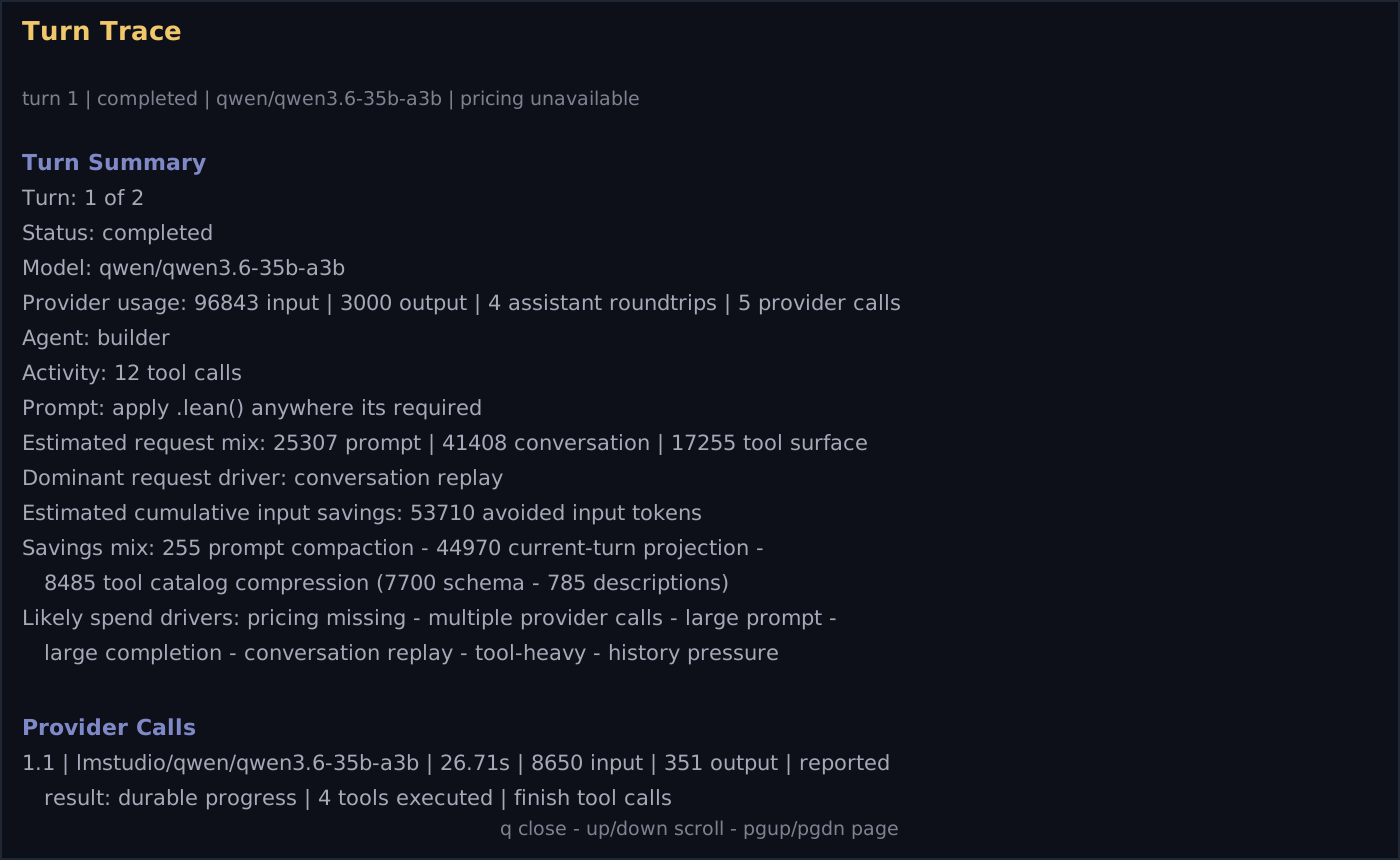
| Label | Meaning |
|---|---|
Estimated request mix |
How much of the request was prompt, conversation replay, and tool surface |
Dominant request driver |
The largest contributor to request size, such as conversation replay or tool surface |
Savings mix |
The same avoided-token breakdown, scoped to that turn |
Likely spend drivers |
Plain-language reasons the turn was expensive or hard to price |
Provider Calls |
Per-call model, duration, token counts, selected route, tool execution outcome, and request mix |
If pricing is unavailable, token accounting still works. Dollar estimates are incomplete until the model has pricing metadata.
Model pricing
Section titled “Model pricing”For the cost estimates to be useful, the runtime needs to know the model’s input and output price. Built-in providers populate this from the remote model catalog. For local or custom providers, use model_overrides:
model_overrides: - ref: local/qwen2.5-coder-32b-instruct name: Local Qwen Coder context_size: 32768 tool_calls: true cost_input: 0 cost_output: 0Setting both costs to 0 means local turns appear in the cost dialog with zero estimated cost rather than missing pricing.